
- Leave management software continues the same shift chain: after rules and rostering, changes are recorded inside the same system.
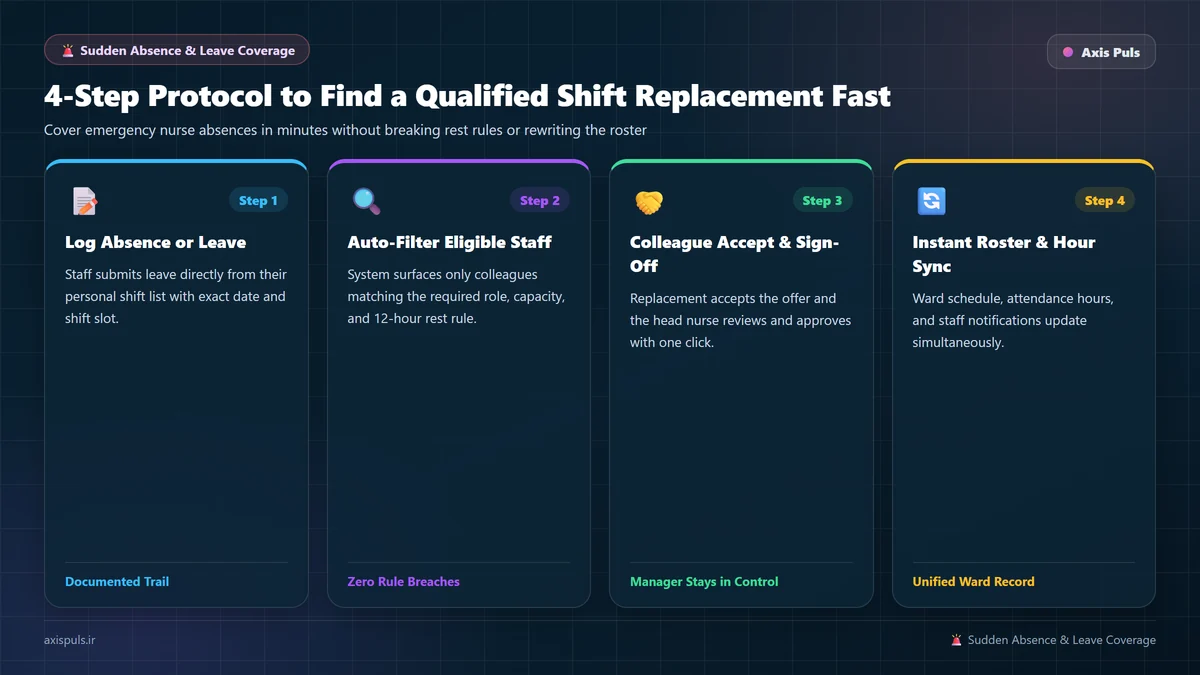
- Staff select leave from inside their own shift list, and the system suggests eligible colleagues to cover the shift — no manual searching between coworkers.
- After leave is recorded and approved, the plan is rewritten for the new situation; that rewrite is the key difference from a plain calendar or table.
- Shift swaps follow a similar path: a request is created, eligible staff are identified, a volunteer accepts, and the plan is updated.
What is leave management software?
No monthly roster survives contact with real life unchanged—one 6 a.m. sick call or family emergency can ripple through an entire Excel sheet. This 5-minute guide walks through finding eligible replacements and handling leave without breaking rest rules or rebuilding the table.
Leave management software is the part of the shift system that ties a leave request to the shift plan. In the traditional method, leave is a message separate from the table: someone announces it over a messenger app, the head nurse searches memory or a notebook for cover, and then several table cells are fixed by hand. But when leave is recorded inside the same system where rules, capacities and the plan itself are defined, every request is connected to that shift's details from the start, and its effect on coverage is handled in a structured way. So the short answer to “what is leave management software” is: a tool that turns leave from a scattered message into a recorded, trackable event inside the shift plan.
How do you manage staff leave requests?
The recurring manager question is: how do you handle staff leave requests without turning each one into a search crisis? The short answer is to bring the starting point inside the system. Traditionally the familiar line is “I cannot come that day, find someone yourself,” which puts the search burden on the individual; the nurse must go colleague by colleague asking who can cover, and the head nurse must still check whether the found cover fits ward rules. That path repeats work twice and records nothing. The structured path, per product documentation, starts elsewhere: staff select the leave option from inside their own shift list.
That simple starting point makes two important differences. First, the request is tied from the start to the person's identity, role, ward and shift details, so the system knows from the moment of recording exactly which gap opened, in which ward and under which conditions — with no need to re-explain the shift to different people. Second, the request is recorded in the same system where rules and capacities are defined, so everything needed for the next step, finding cover, is already at hand. Nobody must search manually between colleagues and ask around, because the system identifies and suggests the people who can take that shift.
- Each request is tied to the person, the confirmed role and the ward — not an anonymous message.
- Shift details (day, slot, capacity and required role) travel with the request from the start.
- Rules and caps for checking cover are available to the system at that very moment.
- The request path stays recorded and trackable instead of getting lost.
| Mid-Month Change Scenario | What Happens via Phone & Paper | Structured Leave & Replacement Flow |
|---|---|---|
| Sudden sick call before a shift | Frantic phone calls to every off-duty nurse | Instant list of eligible staff matching role, rest, and hour caps |
| Planned leave for next month | Paper slip forgotten while building the Excel sheet | Logged ahead of scheduling and respected automatically |
| Peer-to-peer shift swap | Informal trade that accidentally triggers a night-to-morning violation | Rule & cap validation on both colleagues before head-nurse approval |
| End-of-month reconciliation | Wall printout no longer matches actual shifts worked | Single live schedule with full change history |
How do you fix shifts after leave is recorded?
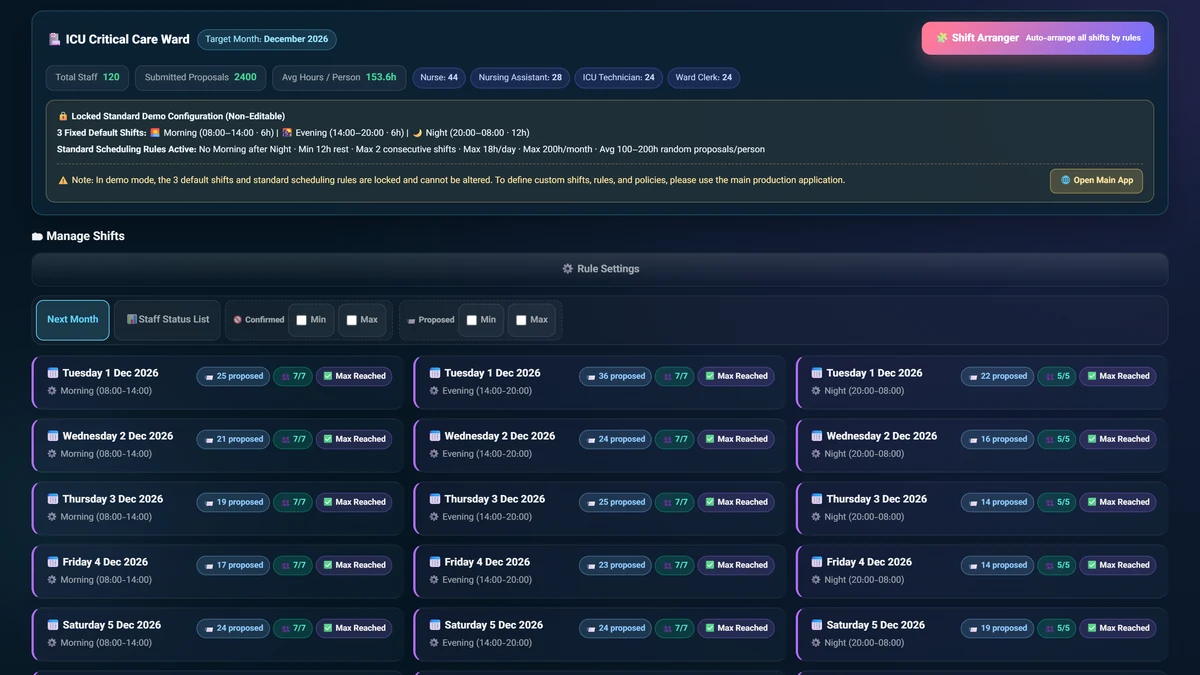
The question of how to fix shifts after leave is recorded is exactly where a system differs from a plain table. In a plain table — paper, spreadsheet or calendar — leave means erasing one name and writing another, and the manager must guess what that change did to hour totals, caps and other slots' coverage. Per product documentation, after leave is recorded and approved the plan does not simply stay as it was; the system applies the change to the plan and rewrites the shift plan for the new situation. That rewrite is the heart of the answer.
A rewrite means three simultaneous updates: the gap is filled with the approved substitute, hour totals and cap status of everyone involved are refreshed, and ward coverage is shown for the new situation. Because these steps run inside the system on the same written rules, the manager always sees a live picture of who stands where — not last week's picture. Importantly, a rewrite is not a manual rebuild; the whole table need not be rostering again to fill one gap. Changing one shift updates that shift under the rules while the rest of the plan stays put, unless a rule requires otherwise.
Where to start?
Reading this guide is a starting point, not a decision point; the decision should rest on your own ward's real experience. Our suggestion is clear, and it is the same line our field team keeps in mind: before deciding, try it. That is, experience the system under your ward's real conditions on a trial basis: write one ward's rules, record requests and leave inside the system for a month, and compare the result with the previous method. In this period, training users — from head nurse to staff — is part of the trial itself, because the leave path is only as good as its recorded requests and rules.
Tie comparison to numbers so it leaves the realm of feeling. Five suggested measures: leave handling time from request to substitute, manual table fixes after each leave, limit and cap compliance after changes, slots left without eligible cover, and finally the experience of head nurses and staff with the path's transparency and traceability. Measure these over two or three months in a row, because one low-leave month paints no accurate picture. If the numbers and the team's experience confirm the structured path, define the same rules for other wards; rules are defined once, then applied every month.
| Exhausting Manual Pattern | Real Impact on Nurses & Patient Care | Ergonomic Guardrail in Structured Rostering |
|---|---|---|
| Night-to-Morning Quick Returns | Acute sleep debt and higher medication-error risk | Hard 12-hour minimum rest rule between shifts |
| Uneven Night & Holiday Pile-Up | Perceived unfairness, resentment, and staff turnover | Monthly night cap and transparent rotation tracking |
| Last-Minute Roster Publication | Impossible family planning and chronic anxiety | Predictable request window and fast draft generation |
| Phone-Tag Shift Swapping | Constant interruptions for both nurses and head nurses | Rule-checked replacement list inside the workspace |
To connect this workflow with adjacent tools and real examples, explore Live Shift Arranger Demo, Nurse Shift Guide, Matron Oversight Guide, Clinical Productivity Law.
❓ Frequently Asked Questions from Real Workflows
Manage next month's leave in a structured way
Requests are recorded from the shift list, eligible substitutes are suggested and the plan is rewritten; compare under real conditions.
Start your trialOr test a simulated ward right now without signing up in the Live Interactive Shift Arranger Demo.