- Problem: Sudden absence means hurried manual searching among colleagues when there is no time, and every wrong choice breaks department rules.
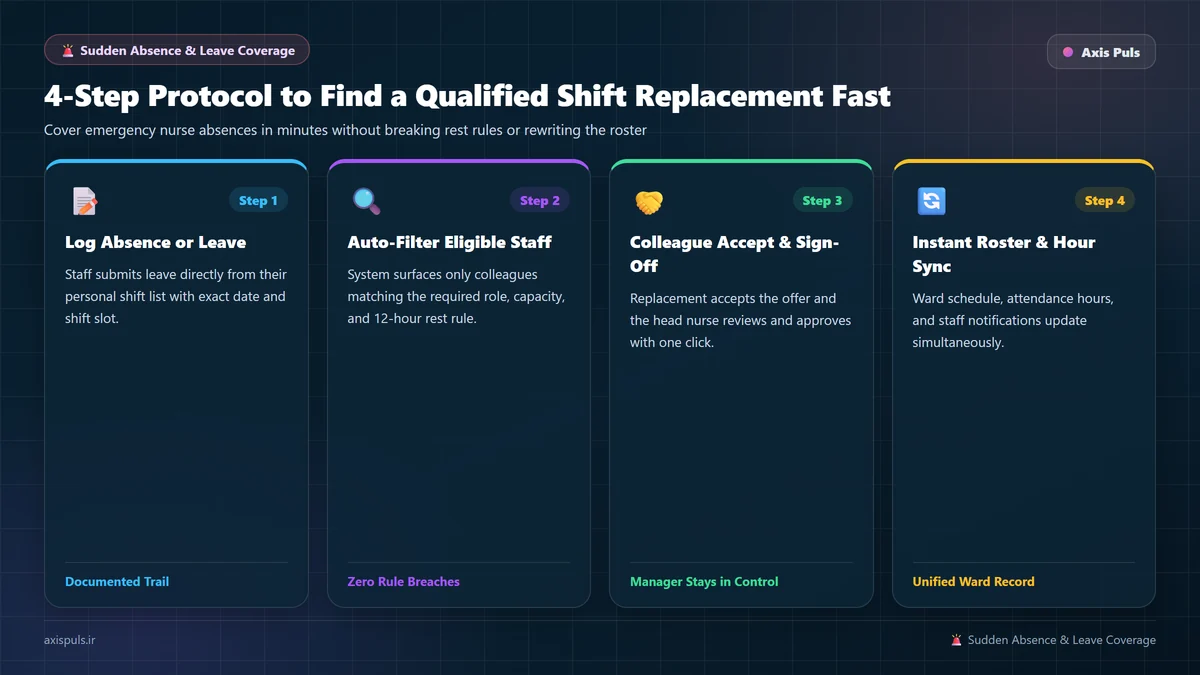
- Cover path: Absence registration from the shift list, identifying eligible people, volunteer acceptance, manager approval, and schedule rewrite.
- Leave coordination: The request is tied to the specifications of that same shift, so it is clear from the start which vacancy opened in which department.
- Shortage: If no allowed option is found, the system does not break rules and reports the case to the manager for a management decision.
Why is sudden absence the most critical moment of a shift plan?
No monthly roster survives contact with real life unchanged—one 6 a.m. sick call or family emergency can ripple through an entire Excel sheet. This 5-minute guide walks through finding eligible replacements and handling leave without breaking rest rules or rebuilding the table.
When the monthly shift plan is closed and announced, everyone breathes easily; but that tidy table falls apart with one phone call. A nurse has fallen ill, an accident happened, or a family emergency came up, and the shift a few hours away is left without staff. In the traditional method an unequal race against time starts from that moment: the ward supervisor must call or message colleagues one by one, everyone has an excuse or is unreachable, and even if someone accepts, it is unclear whether taking this shift is compatible with department rules.
Four steps to finding cover per the product documentation
The logic of the replacement path is simple and deliberately similar to the ordinary leave path; because in a crisis moment nobody has time to learn a new process. The only differences are speed and sensitivity. See these four steps in order.
The starting point is the absent person or the ward supervisor. the leave option is selected from inside the shift list, and this simple starting point differs from a phone message in two important ways. First, the request is tied from the start to the identity of the person, their role, the relevant department, and the specifications of that same shift; so from the moment of registration the system knows exactly which vacancy opened in which department under which conditions. Second, the request is registered in the same system where rules and capacities are defined; so for the next step of finding cover, all required information is already available with no need to re-explain the shift to anyone. This is the same leave coordination we deepen in the next section.
- Step one, absence registration: The person selects the leave option for that same shift from inside their own shift list, so the vacancy is recorded with its department, role, and timing.
- Step two, identifying the allowed pool: The system identifies and suggests people who are allowed to take that shift under rules, capacity, role, and shift status.
- Step three, volunteer acceptance: The request is sent to eligible people and a volunteer accepts it from among the allowed options.
- Step four, approval and rewrite: The department manager approves and the schedule is rewritten for the new situation.
| Mid-Month Change Scenario | What Happens via Phone & Paper | Structured Leave & Replacement Flow |
|---|---|---|
| Sudden sick call before a shift | Frantic phone calls to every off-duty nurse | Instant list of eligible staff matching role, rest, and hour caps |
| Planned leave for next month | Paper slip forgotten while building the Excel sheet | Logged ahead of scheduling and respected automatically |
| Peer-to-peer shift swap | Informal trade that accidentally triggers a night-to-morning violation | Rule & cap validation on both colleagues before head-nurse approval |
| End-of-month reconciliation | Wall printout no longer matches actual shifts worked | Single live schedule with full change history |
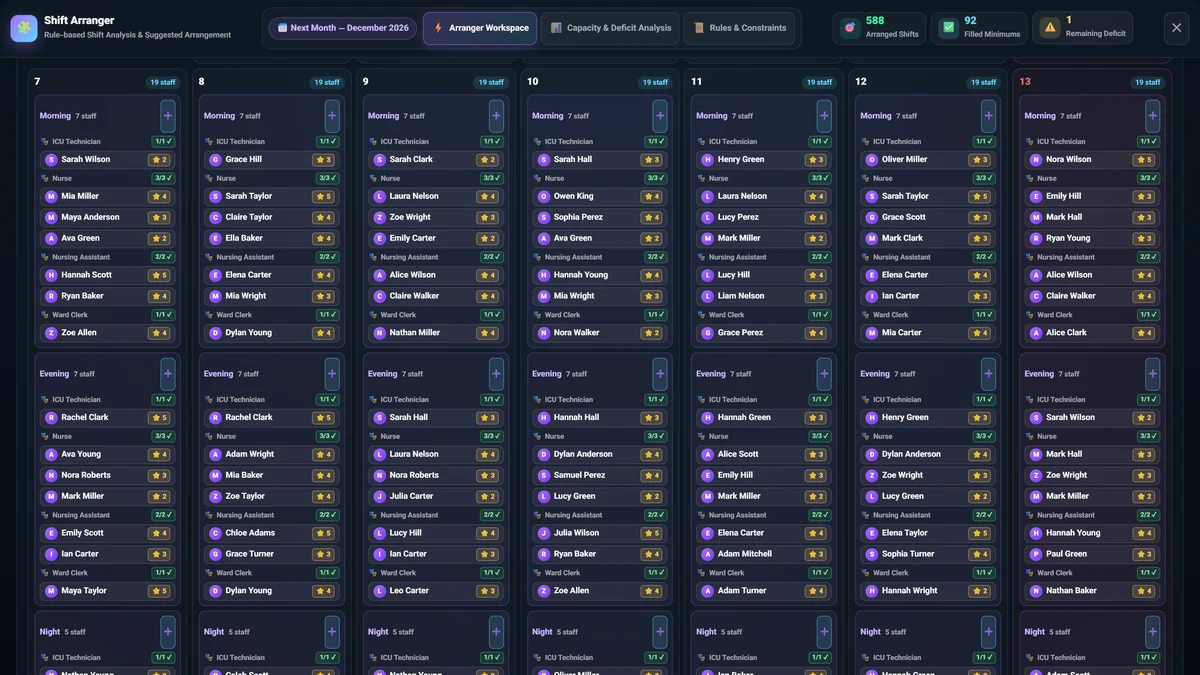
What differs in emergency leave coordination?
Emergency leave is the same as ordinary leave, only with less time and more stress; and these two differences multiply the value of structured registration. When the request is registered in the system, three good things happen. First, trackability; the request stays recorded in the system and, unlike scattered messages, is not lost. If the first volunteer backs out, the process continues from a known point, not from zero. Second, managerial visibility; the supervisor watches the cover progress in the system structure without reviewing ten conversations. Third, connection to shift specifications; because the request connects to the department, role, time, and capacity of that same shift, every suggested replacement is measured for that exact vacancy, not guessed.
A common mistake in emergencies is bending the rules for speed, for example inviting someone whose weekly ceiling is already full. the replacement suggestion logic blocks exactly this mistake, because only allowed options reach the table. For the full picture of this logic read the leave and handover guide; the working hours page for the time framework and shift control for post-cover monitoring are suitable companions.
What if no eligible replacement is found?
This is the most honest part of this guide: sometimes there is truly nobody. Every allowed team member is either on shift, has a full ceiling, or is unreachable. in this situation the system does not break rules to fill the table; it reports the case to the manager so the required management decision is made. This behavior is what separates the system from a smart phone book; because cover that breaks the rules solves today and builds a bigger crisis for tomorrow.
Reviewing task division inside the shift with the same present staff, respecting each role and capacity.
| Exhausting Manual Pattern | Real Impact on Nurses & Patient Care | Ergonomic Guardrail in Structured Rostering |
|---|---|---|
| Night-to-Morning Quick Returns | Acute sleep debt and higher medication-error risk | Hard 12-hour minimum rest rule between shifts |
| Uneven Night & Holiday Pile-Up | Perceived unfairness, resentment, and staff turnover | Monthly night cap and transparent rotation tracking |
| Last-Minute Roster Publication | Impossible family planning and chronic anxiety | Predictable request window and fast draft generation |
| Phone-Tag Shift Swapping | Constant interruptions for both nurses and head nurses | Rule-checked replacement list inside the workspace |
To connect this workflow with adjacent tools and real examples, explore Live Shift Arranger Demo, Nurse Shift Guide, Head Nurse Software, Matron Oversight Guide, Clinical Productivity Law.
❓ Frequently Asked Questions from Real Workflows
Cover the next absence without stress
Try for two months in the real conditions of your organization and then decide.
Start the trial periodOr test a simulated ward right now without signing up in the Live Interactive Shift Arranger Demo.