- Issue: Collecting shift requests by SMS and paper is time-consuming, and every leave or transfer messes up several parts of the schedule.
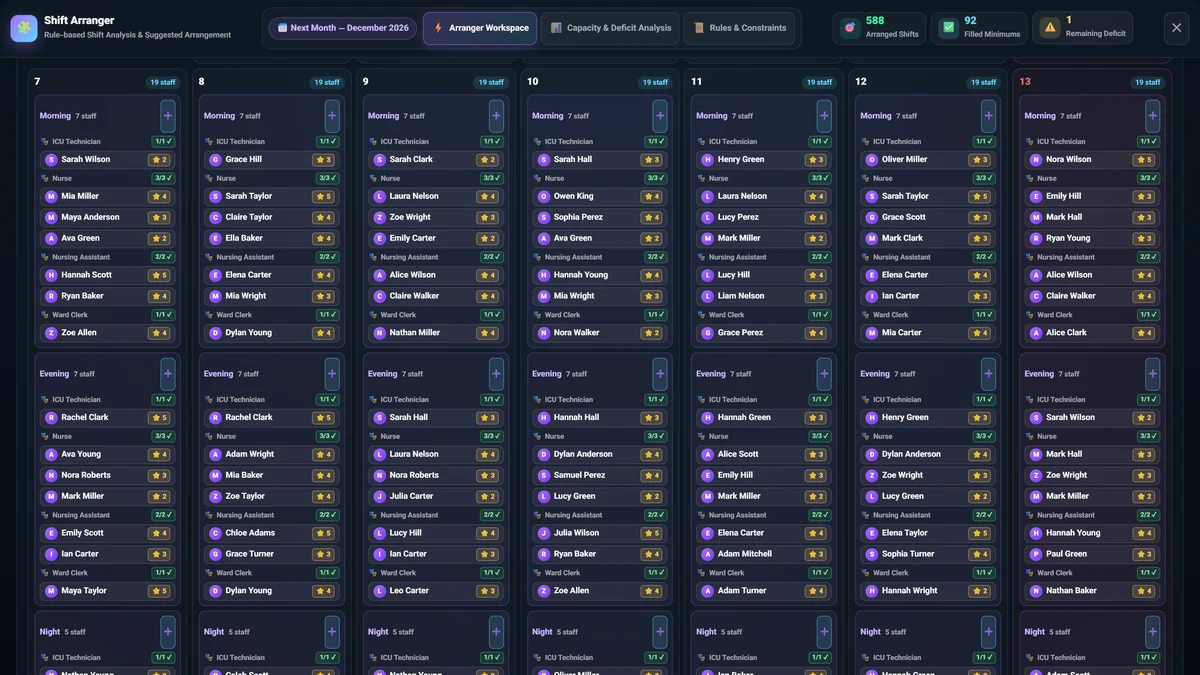
- Solution: Shifts are defined by name and start and end time, and layout rules are registered once and applied every month.
- Work path: Registration of the offer with priority → review and approval or rejection by the shift head → layout with rules → final approval of the monthly plan.
- Trust: If a shift cannot be completed according to the rules, the system does not violate the rule and reports the matter to the manager.
What problem does shift management solve?
When ward rules live inside one person's memory, every month repeats the same cycle of scattered chat requests, manual spreadsheet edits, and night-shift fairness disputes. In this focused 5-minute read, see how head nurses, matrons, and hospital leads move from manual table-building to clear oversight—and test a live ward right away in the interactive shift demo.
In many shift sets, personnel requests are collected from various channels such as paper, SMS, messenger or call. The shift manager has to put these requests together, remember each person's limits, and set the schedule by hand. As the number of forces and rules increases, a small change can move several parts of the program and take days to prepare the table. Ability to manage shifts Axis Puls is designed for this situation: a specific route from Define the shift → register the rules → register the offer → check the shift → layout → final approval of the month; all its steps can be registered and tracked in one system.
Definition of shift, capacity and layout rules
Starting point Definition of shift is: Each shift is identified by name and start and end time. A shift can be specific to a role or defined for the entire department. Then, capacities are determined for each shift; From minimum and maximum number of people to capacity based on role and gender and daily, weekly and monthly limits. In this way, the system not only knows who should have a shift; He knows who, in what department, with what role, at what time and in what capacity can be placed in a shift.
The name of the shift along with the start and end time; Specific to a role or common to the entire department.
| Buyer Criterion | Excel & Chat Apps | Generic Time-Clock Tools | Clinical Shift Platform (Axis Puls) |
|---|---|---|---|
| 12h Rest & No Night-to-Morning | Manual visual checks prone to fatigue | Logs punches only after violations happen | Preventive rule check before roster sign-off |
| 1.5x Night/Holiday Factor & Hour Caps | Fragile hand-written formulas | Lacks ward-specific clinical rules | Configurable per ward, role, and seniority |
| Staff Shift Preferences | Scattered across paper notes and DMs | Rigid or nonexistent | Priority 1–3 requests inside one calendar |
| Pre-Purchase Validation | No automated constraint check | Requires server setup & sales call | Instant live Shift Arranger demo + 2-month pilot |
Registration of shift proposal and review by head shift
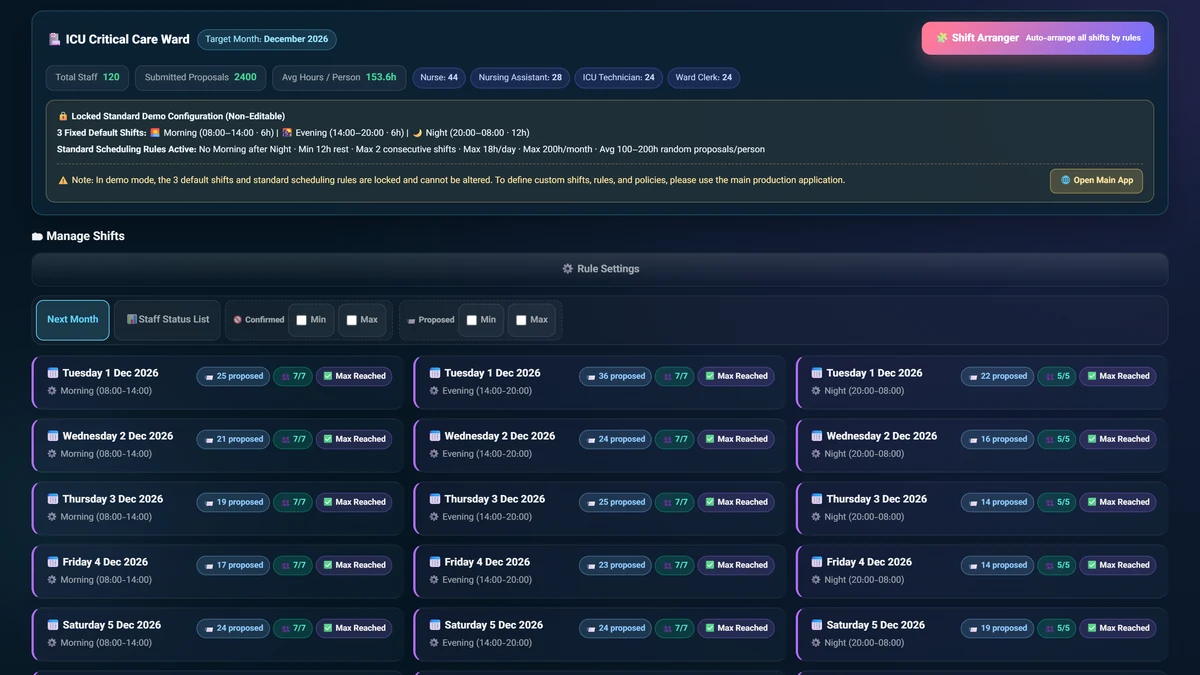
After defining the shifts and rules, it's time to register shift offers. Employees choose their desired days and shifts from the calendar and use priorities to indicate which shift suits them best. These priorities are collected in the system and are the basis of the layout; That is, the employee says he prefers these shifts, and the system measures these preferences with rules and capacities when arranging.
The next step is review by the shift head: the shift head views the submitted offers and approves or rejects each one. The status of each offer—pending, approved, or rejected—is visible in the Staff Shifts list and the My Reports section, so each employee knows the status of their request. This transparent cycle reduces SMS and paper back and forth and all decisions are recorded in one place.
Launch, Trial Period and Pricing Model
The beginning of the work is done by knowing the structure of the collection: defining the workplace and departments, registering rules and restrictions, defining roles and shifts and capacities, adding employees and training users. After these steps, new collections Two months on a trial basis In real conditions, they use the system to compare the program preparation time, the number of changes and the shift experience with the previous method. According to the current model, for capacity Up to 75 people: 2,500,000 Tomans per month and 19,000,000 Tomans per year and other capacities are determined according to the contract and the number of users.
For a more in-depth understanding of calculation principles and layout rules, read: A comprehensive guide to smart shift management, Suggested Shift, Desired Shift, Nursing Shift Management and Work shift adjustment.
| Hospital Role | Core Monthly Priority | Manual Bottleneck Today | Practical Outcome in Axis Puls |
|---|---|---|---|
| Shift Nurse / Staff | Predictable schedule and fair night rotation | Sending WhatsApp notes with no confirmation trail | Submit ranked preferences and track approval status |
| Head Nurse (Ward Lead) | Safe coverage across every shift without conflicts | Days spent rebuilding spreadsheets after one leave | Define ward rules once, generate drafts fast, sign off |
| Matron (Nursing Director) | Cross-ward balance and overtime visibility | Chasing mismatched Excel sheets across 10+ wards | Unified multi-ward oversight and clean sign-off trail |
| Hospital / HR Director | Compliance, cost control, and staff retention | Late attendance reconciliations and payroll disputes | Role-based access, audit logs, and verified monthly rosters |
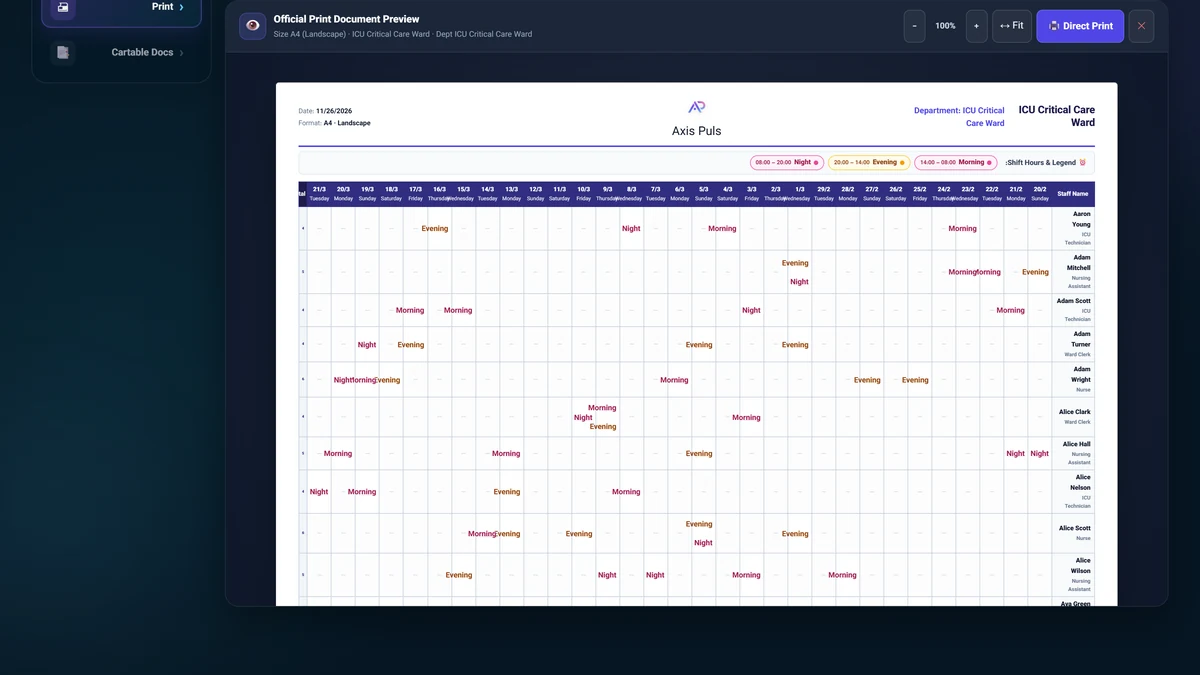
This feature is not only for nurses; Every force that has a shift schedule — from doctors and service forces to security, guard and shift administrative forces — is managed with this structure. The important thing is that Axis Puls doesn't just create tables; The shift management process is managed and the final decision is always with the manager and the shift leader. The system performs the computational part and checks the constraints so that the shift from manually arranging the table is closer to the management and control of the program.
To connect this workflow with adjacent tools and real examples, explore Live Shift Arranger Demo, Nurse Shift Guide, Head Nurse Software, Matron Oversight Guide, Clinical Productivity Law, Excel vs. Shift Software.
❓ Frequently Asked Questions from Real Workflows
Register the rules once; Manage every month
Try for two months in the real conditions of your collection and then decide.
Start of trial periodOr test a simulated ward right now without signing up in the Live Interactive Shift Arranger Demo.