- Using the Eisenhower matrix, devised by Dwight Eisenhower (the 34th US president), is one of the most powerful tools for separating “important tasks” from “urgent tasks”.
- Follow each section's practical tips in the article's tip boxes.
- Read answers to frequent questions in this page's FAQ section.
Interactive Eisenhower Matrix Task Scheduler
Tag each task by Urgency & Importance (Quadrants 1–4), schedule your Q1/Q2 blocks conflict-free, and save directly to Axis Puls.
Live preview of your schedule
History and purpose of the Eisenhower matrix
Planning sticks when it stays lightweight, flexible, and anchored to real priorities rather than rigid minute-by-minute perfectionism. In this 5-minute guide, build a calm daily and weekly execution system.
Using the Eisenhower matrix, devised by Dwight Eisenhower (the 34th US president), is one of the most powerful tools for separating “important tasks” from “urgent tasks”.
The 4 Eisenhower decision quadrants in detail
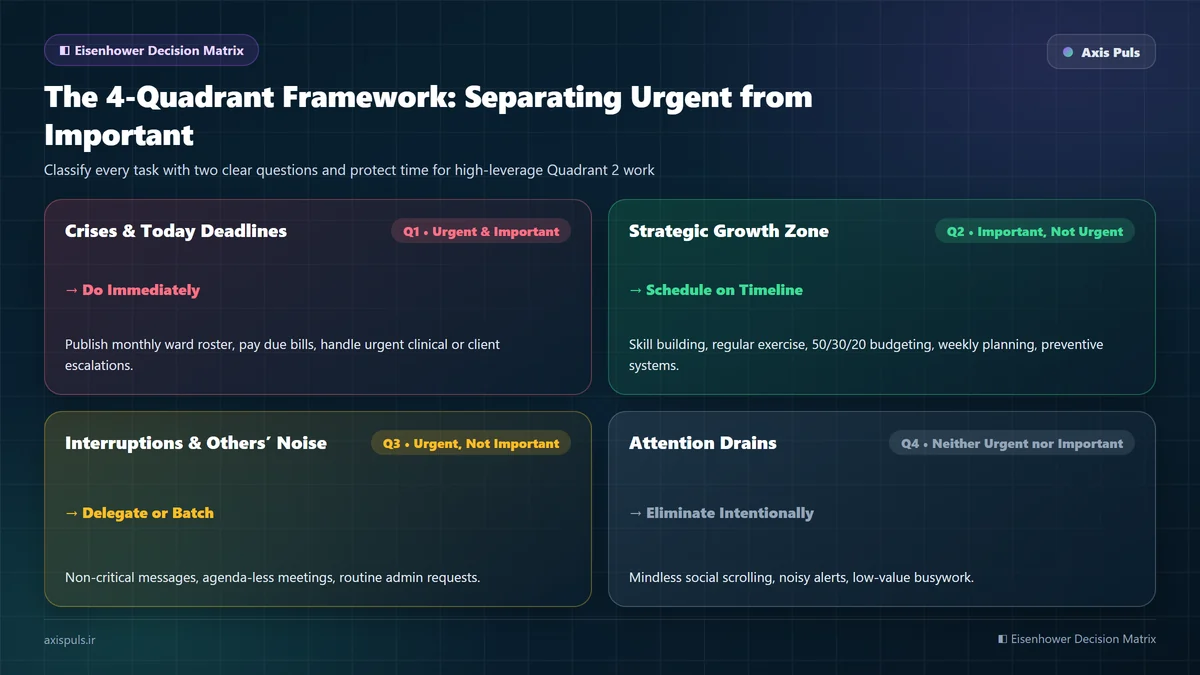
This matrix divides all tasks into 4 parts:
Important tasks are never urgent and urgent tasks are never important; find the balance in quadrant 2.
- Quadrant 1 (important and urgent): crises and expired deadlines -> do it right now!
- Quadrant 2 (important but not urgent): planning, goal setting and exercise -> schedule it!
- Quadrant 3 (unimportant but urgent): interruptions and emails -> delegate it!
- Quadrant 4 (neither important nor urgent): wasting time on social media -> delete it!
| Eisenhower Quadrant | Quick Diagnostic Signal | Right Practical Action | Everyday Example |
|---|---|---|---|
| 1. Urgent & Important | Real deadline today with clear consequences | Do first during your peak focus block | Finalizing a ward roster, urgent client fix, medical errand |
| 2. Important, Not Urgent | Compounds long-term growth and prevents future crises | Schedule a protected slot on your timeline | Skill study, exercise, monthly budget check, weekly planning |
| 3. Urgent, Less Important | Noisy pings driven by other people's impulsiveness | Batch into a short window or delegate cleanly | Non-critical chat notifications, agenda-free status calls |
| 4. Neither Urgent nor Important | Pure distraction disguised as busywork | Drop intentionally without guilt | Mindless mid-work social scrolling or tweaking folder colors |
The golden second quadrant (growth and planning)
The more time you spend in quadrant two (important but not urgent), the fewer quadrant-one crises you will face.
- Quadrant 1 (important and urgent): crises and expired deadlines -> do it right now!
- Quadrant 2 (important but not urgent): planning, goal setting and exercise -> schedule it!
- Quadrant 3 (unimportant but urgent): interruptions and emails -> delegate it!
- Quadrant 4 (neither important nor urgent): wasting time on social media -> delete it!
Using the Eisenhower matrix in Axis Puls
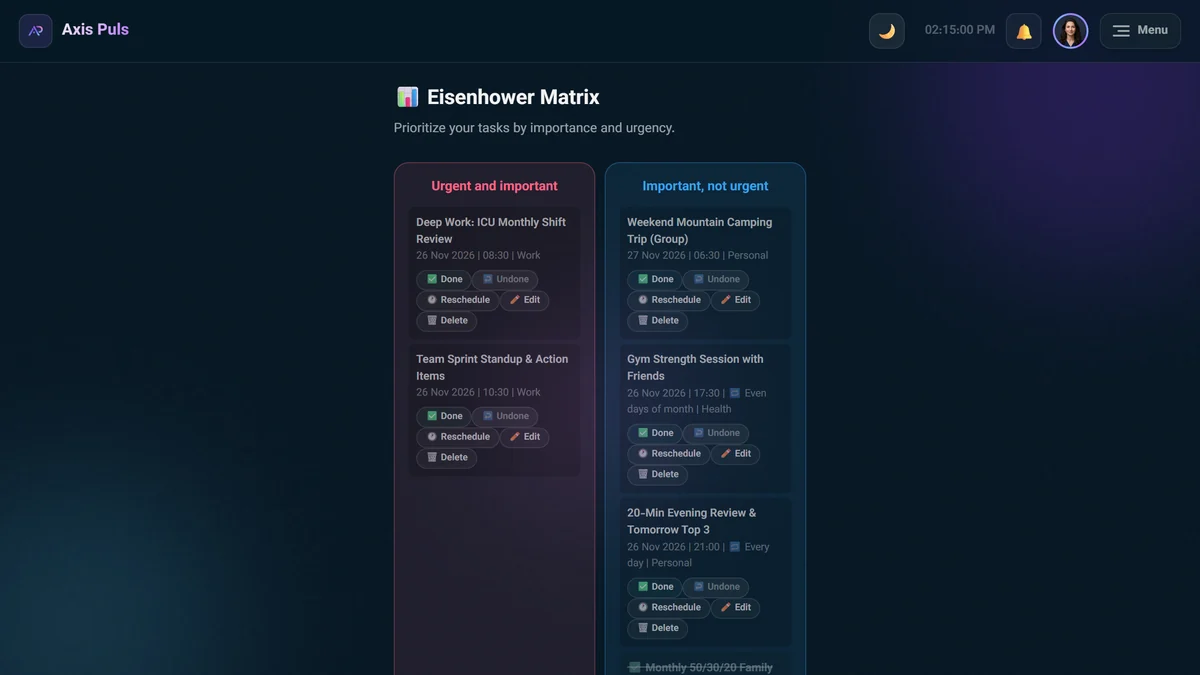
With a dedicated Eisenhower board, Axis Puls lets you easily sort tasks into 4 priority boxes.
| Real User Situation | Common Emotional Trap | Sustainable Practical Response |
|---|---|---|
| Falling behind by mid-afternoon | Doubling tomorrow's workload and burning midnight oil | Prune low-value tasks immediately and rescue 1–2 core items |
| Setting monthly or quarterly goals | Writing vague wishes like 'get organized' with no calendar slot | Break each goal into concrete weekly milestones on your timeline |
| Running meetings or group plans | Open-ended calls with no agenda, owner, or stop time | Attach a 3-bullet agenda, hard end time, and action checklist |
| Choosing planning software | Juggling four complex apps until tool fatigue wins | Keep daily tasks, Eisenhower priority, and shifts in one place |
To connect this workflow with adjacent tools and real examples, explore Personal Planner, Task Prioritization, Time-Blocking, Weekly Planning, Group Planning, Smart Checklists.
- Pick at most 3 non-negotiable outcomes for today and relegate everything else to secondary status.
- Give each core task a realistic window using time-blocking with short breathing room in between.
- For team meetings, attach a clear goal, hard stop time, and smart checklist of action owners.
- When procrastinating after a delay, use the 5-minute rule to complete just the opening step of your main task.
A monthly or annual goal stays a wish until it claims a real 45-minute block on this week's calendar. Spend ten quiet minutes at the start of the week asking: 'Which two concrete steps move my main goal forward before Friday?'—then lock those two blocks onto your timeline like doctor appointments.
For healthcare professionals and shift teams, viewing your next shift, personal priorities, and team collaboration threads under one roof stops you from accidentally booking deep errands right after an exhausting night duty.
If you have ever bought a fresh notebook or tried three productivity apps only to abandon them four days later, willpower is rarely the culprit—optimism bias is. Most people plan for an imaginary Tuesday with zero surprise calls, traffic delays, low-energy afternoons, or changing working hours. The moment one 10 a.m. interruption hits, a tightly packed schedule shatters and guilt pushes you to give up on the rest of the day.
❓ Frequently Asked Questions from Real Workflows
Organize your tasks in the Axis Puls Eisenhower matrix
Build your prioritization matrix today.
Open the Eisenhower matrix